Bulk operations overview
The bulk operations system lets you create and modify BroadWorks entities from CSV files or Python data structures.
Architecture
The system has three layers:
- BulkOperations (gateway) - User-friendly methods for each entity type
- Entity layer - Individual operation classes like
UserBulkOperationsandCallCenterBulkOperations - BaseBulkOperations (base) - Shared processing logic
Data processing pipeline
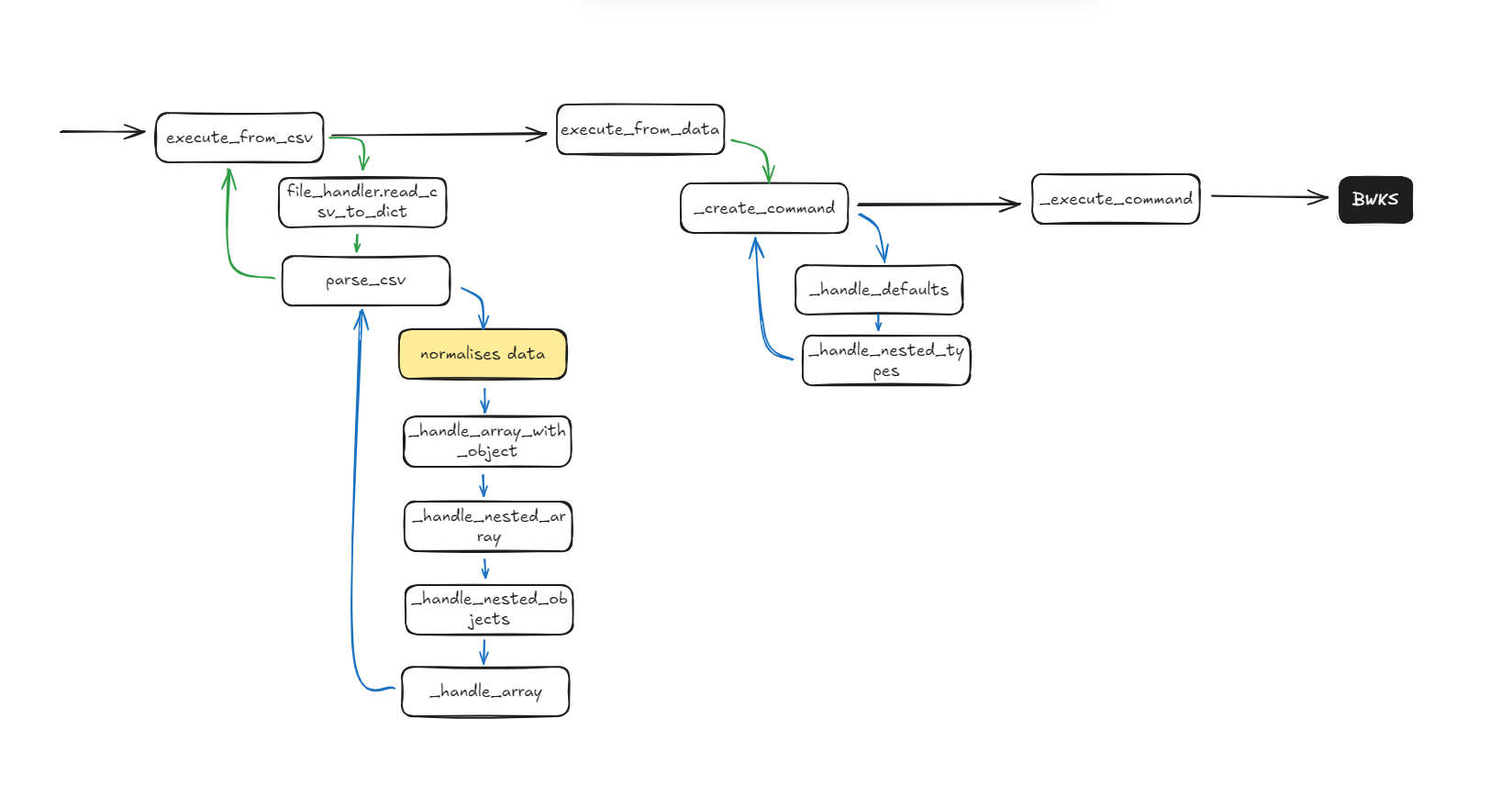
Data flows through these stages:
- Input - CSV file or Python data structure
- Parse - Convert CSV rows or dicts to structured data
- Transform - Apply type conversions, defaults, and nested object handling
- Command creation - Build OCI command objects with nested types
- Execute - Send commands to BroadWorks
- Results - Return structured response data
Key components
BaseBulkOperations
Abstract base class with shared processing logic:
- CSV parsing with nested object and array handling
- Data type conversions (booleans, integers, phone numbers)
- Command creation with nested type instantiation
- Default value application
- Error handling and result formatting
Entity operations
Each entity type has its own class inheriting from BaseBulkOperations:
UserBulkOperationsCallCenterBulkOperationsDeviceBulkOperationsAutoAttendantBulkOperationsHuntGroupBulkOperationsCallPickupBulkOperations
Each class defines an operation_mapping dictionary that configures:
- OCI command classes
- Nested type mappings
- Default values
- Integer field conversions
BulkOperations gateway
The BulkOperations class provides a single interface:
from mercury_ocip import Client, Agent

client = Client(...)
agent = Agent.get_instance(client)

# Access all bulk operations through agent.bulk
agent.bulk.create_user_from_csv("users.csv")
agent.bulk.create_call_center_from_data([...])
Data formats
CSV format
CSV files use dot notation for nested objects and bracket notation for arrays:
- Nested objects:
serviceInstanceProfile.name - Arrays:
alias[0],alias[1] - Nested arrays:
accessDeviceEndpoint.contact[0] - Arrays with objects:
alternateUserId[0].alternateUserId
Python data format
Python dictionaries use snake_case keys and nested dictionaries:
{
    "operation": "user.create",
    "service_provider_id": "SP",
    "service_instance_profile": {
        "name": "Call Center",
        "calling_line_id_first_name": "Center"
    },
    "alias": ["cc1", "cc2"]
}
Operation mapping
Each entity operation class defines an operation_mapping that specifies:
{
    "operation.name": {
        "command": "OCIClassName",  # OCI command class name
        "nested_types": {...},       # Nested type conversions
        "defaults": {...},           # Default values
        "integer_fields": [...]      # Fields to convert to int
    }
}
See Adding a New Bulk Operation for details.
Response format
All operations return a list of result dictionaries: